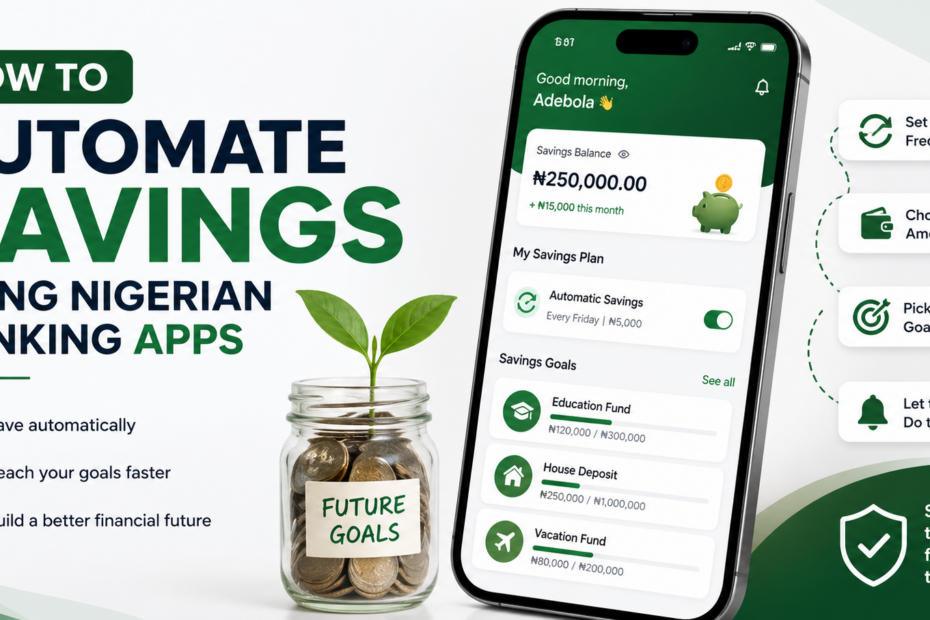
For many Nigerians, saving money is something that always starts with good intentions but rarely happens consistently. At the beginning of the month or after receiving income, there is usually a plan to save something. However, as the days go by, expenses start coming up—food, transport, data, bills, and unexpected needs—and the money gets spent before any real savings are made.
This is a common struggle: money gets spent before saving even happens. Instead of building savings gradually, many people end up with nothing left at the end of the month. Over time, this makes it difficult to build financial security or handle emergencies without borrowing.
This is why automation has become an important part of modern saving habits. Instead of relying on willpower or memory, automated saving systems help you save money without thinking about it every time. Once it is set up, the process runs in the background while you focus on your daily life.
Today, several Nigerian banking and fintech apps make this process even easier. These apps allow users to schedule automatic transfers, lock savings, and set rules that move money into savings accounts without manual effort. This removes the temptation to spend first and save later.
In this guide, you will learn how to automate your savings using Nigerian banking apps, so you can build consistency, reduce financial stress, and grow your money effortlessly over time.
What Does Automated Saving Mean?
Automated saving simply means setting up a system where money is saved for you automatically without you having to do it manually every time. Instead of reminding yourself to save or waiting until the end of the month, the process happens on its own based on instructions you have already set.
In simple terms, it is saving without thinking or manual effort. Once your salary or income enters your account, a fixed amount can automatically be moved into your savings account. This removes the pressure of deciding whether to save or spend, because the decision has already been made in advance.
Automated saving also works as a scheduled or rule-based system. This means you can set specific rules such as saving a certain amount daily, weekly, or monthly. Some systems even allow rules like saving a percentage of every deposit or rounding up your spending and saving the difference.
For example, if you set a rule to save ₦1,000 every week, the system will automatically transfer that amount without you needing to approve it each time. Over time, these small automated transfers build up into meaningful savings.
In simple terms, automated saving takes away the stress of discipline and replaces it with structure. Instead of relying on motivation, you rely on a system that consistently helps you save money in the background.
Why Automation Helps You Save More
Automating your savings is one of the most effective ways to build financial discipline, especially in Nigeria where daily expenses and financial pressure can easily affect your decisions. It helps you save consistently without relying on motivation or willpower.
One major benefit is that it removes emotional spending. Many people spend money based on how they feel in the moment—whether it’s stress, excitement, or peer pressure. When savings are automated, the money is moved out of your reach before you even have the chance to spend it emotionally.
Another advantage is that it builds discipline automatically. Instead of forcing yourself to save every time you get income, the system does it for you. This creates a consistent saving habit without constant effort or decision-making, making it easier to stay on track over time.
Automation is also very useful because it works for low and irregular income earners. Whether you receive salary, business income, or occasional payments, you can still set a small fixed amount or percentage to be saved automatically. This makes saving possible even when income is not stable.
Most importantly, automation helps prevent the common habit of “I’ll save later.” Many people intend to save at the end of the month, but by then, the money has already been spent. Automated saving removes this delay by saving immediately or on a fixed schedule.
In simple terms, automation makes saving easier, more consistent, and less dependent on human discipline, which is why it is one of the best financial habits to adopt.
Step 1: Choose the Right Nigerian Banking App
The first step to automating your savings is choosing a reliable Nigerian banking or fintech app that supports automatic saving features. The goal is to pick a platform that makes saving easy, flexible, and consistent without requiring constant manual effort.
Two of the most popular options in Nigeria are PiggyVest and Kuda. These apps are widely used because they offer different types of automated saving tools that help users build discipline with little stress.
PiggyVest is known for its strong saving structure. It allows you to automate savings daily, weekly, or monthly using its AutoSave feature. You can also set fixed savings goals, lock funds so you cannot access them easily, and even earn interest on your savings. This makes it ideal for people who want strict discipline and long-term saving habits.
On the other hand, Kuda offers a more flexible banking experience. It includes automatic saving options, spending tracking, and budget features that help you manage money more easily. It is useful for people who want savings automation combined with everyday banking convenience.
When comparing both apps:
- Flexibility: Kuda is more flexible for daily banking needs
- Locked savings: PiggyVest is stronger for strict saving discipline
- Auto-save tools: Both apps support scheduled automatic savings, but PiggyVest is more structured for goal-based saving
In simple terms, PiggyVest is better if you struggle with discipline and want strict control over your savings, while Kuda is better if you want a mix of banking and light savings automation. Choosing the right app is important because it sets the foundation for how consistently you will save over time.
Step 2: Set Up Automatic Transfers
Once you’ve chosen a suitable banking or savings app, the next step is to activate automatic transfers so your savings happen without effort. This is where consistency becomes easier because the system does the work for you.
Start by scheduling your savings daily, weekly, or monthly, depending on your income pattern. If you earn a salary, monthly transfers may work best. If your income is irregular or comes in small amounts, weekly or daily automation can help you stay consistent without pressure.
A very important rule is to move money immediately after income arrives. This is the “pay yourself first” approach in action. As soon as money enters your account, a portion should automatically go into savings before you have a chance to spend it on bills, transport, or impulse purchases. This prevents the common problem of intending to save but spending everything first.
You should also decide whether to use a fixed amount or a percentage-based system. A fixed amount means you always save the same value, such as ₦1,000 weekly. A percentage-based system means you save a portion of whatever you earn, such as 10% or 20% of income. Percentage saving is often better for people with irregular income because it adjusts automatically to how much you earn.
In simple terms, setting up automatic transfers helps you remove decision-making from saving. Once it is properly configured, your money is saved consistently in the background, helping you build financial discipline without stress.
Step 3: Use “Rules-Based Savings” Features
Many Nigerian banking and fintech apps now include smart tools that help you save automatically based on specific rules. These features are powerful because they remove the need to constantly think about saving and instead make it part of your daily financial activity.
One useful feature is round-up savings (spare change saving). This means whenever you spend money, the app rounds up the transaction to the nearest amount and saves the difference. For example, if you spend ₦1,450, it may round it up to ₦1,500 and save the extra ₦50. Over time, these small amounts accumulate into meaningful savings without you noticing.
Another helpful option is spending triggers, where the app saves money every time you make a transaction. For instance, a rule can be set so that every time you spend, a fixed percentage or small amount is automatically moved into your savings account. This helps you save while you spend, turning everyday purchases into saving opportunities.
You can also use lock savings options, which allow you to restrict access to your money for a fixed period. Once money is locked, you cannot withdraw it until the set time is over. This is especially useful for people who struggle with discipline or tend to withdraw savings impulsively.
In simple terms, rules-based savings help you save automatically through your normal financial activities. Instead of relying on motivation, your everyday spending becomes a tool for building financial discipline and growing your savings consistently.
Step 4: Separate Savings from Spending Money
A key principle of successful automated saving is keeping your savings completely separate from the money you use for daily spending. When everything is in one account, it becomes very easy to “accidentally” spend money that was meant for savings.
To avoid this, you should avoid mixing accounts. Your salary or income account should not be the same place where your savings are stored. Once money is received, a portion should automatically move into a separate savings account so you are less tempted to touch it.
Using a dedicated savings wallet is even more effective. Many Nigerian banking apps allow you to create separate savings spaces or wallets for different goals. This helps you clearly distinguish between money for spending and money for saving. When savings are isolated, it becomes psychologically harder to treat them as available cash.
This separation greatly improves financial discipline. When savings are out of sight and out of easy reach, you are less likely to withdraw them for unnecessary expenses. It also helps you think more carefully before spending because you know your spending money is limited and clearly defined.
In simple terms, separating savings from spending money creates structure and reduces temptation. It protects your savings from impulsive decisions and helps you stay consistent with your financial goals over time.
Step 5: Start Small and Increase Gradually
When setting up automated savings, one of the biggest mistakes people make is trying to save too much too quickly. This often leads to frustration and eventually stopping altogether. A better approach is to start small and build consistency first.
Begin with a realistic amount such as ₦500–₦1,000 daily or weekly, depending on your income level. The goal at this stage is not the size of the savings but the habit of saving regularly without failure. Small amounts are easier to maintain, especially when expenses are tight or income is irregular.
As your income improves or you become more comfortable with the system, you can gradually increase your savings amount. For example, you might start with ₦1,000 weekly and later move to ₦2,000 or more. This gradual increase ensures that saving grows alongside your financial capacity without putting pressure on your daily needs.
The most important factor throughout this process is consistency. It is better to save a small amount regularly than to set a high target that you cannot maintain. Consistency builds discipline, and discipline is what leads to long-term financial success.
In simple terms, starting small removes pressure, while increasing gradually helps you grow your savings sustainably. This combination makes automated saving easier to maintain over time.
Step 6: Track Your Savings Growth
Automated savings only works well when you also pay attention to your progress. Tracking your savings helps you stay aware of how much you are building over time and keeps you motivated to continue.
Most Nigerian banking and fintech apps provide dashboards that show your savings progress. These dashboards make it easy to see how much you have saved, how much interest you are earning (if applicable), and how close you are to your financial goals. Checking this regularly helps you stay connected to your money without needing manual calculations.
It is also important to set monthly savings goals. Instead of just saving randomly, decide how much you want to save within a month. For example, you can set a target like ₦10,000 or ₦20,000 depending on your income. Having a clear target gives your savings direction and makes it easier to measure success.
Tracking your progress also helps you stay motivated by visible growth. When you see your savings increase gradually, it encourages you to continue the habit. This motivation is important, especially during months when expenses are high and saving feels difficult.
In simple terms, tracking your savings turns automation into a more intentional habit. It helps you stay focused, measure your progress, and maintain consistency as your savings grow over time.
Common Mistakes to Avoid
Even though automated savings makes the process easier, many people still struggle to build consistency because of a few avoidable mistakes. Understanding these mistakes can help you stay on track and make the most of your savings system.
One common mistake is turning off automation too easily. Some people set up automatic savings but disable it the moment they feel financial pressure or see other spending needs. The problem is that once automation is turned off, it becomes difficult to restart the habit. Consistency is broken, and savings stop growing.
Another major issue is using the savings account for spending. The purpose of automation is to separate savings from everyday money, but if you keep withdrawing from it for non-essential expenses, the system loses its value. This turns your savings account into another spending account instead of a financial safety tool.
A third mistake is setting unrealistic savings amounts. Many people start with high targets that do not match their income level. When they fail to meet these targets, they become discouraged and eventually stop saving altogether. It is always better to start small and grow gradually than to set goals you cannot maintain.
In simple terms, avoiding these mistakes helps you protect your financial discipline. Automated savings only works when it is consistent, realistic, and properly separated from daily spending habits.
Conclusion
At the end of the day, automated savings is one of the simplest ways to build financial discipline without stress. Instead of relying on constant reminders or willpower, the system quietly helps you save in the background while you focus on your daily life. This makes saving less of a struggle and more of a habit.
The most important lesson is that discipline becomes easier when it is automated. You don’t have to fight the temptation to spend or wait until the end of the month to see what is left. Your savings are already taken care of from the start, which gives you more control and peace of mind.
Over time, even small savings grow into something meaningful. What starts as ₦1,000 or ₦5,000 weekly can gradually build into a strong financial cushion. The key is consistency, not the size of the amount.
Now it’s your turn to take action. Don’t just read and move on—start building the habit immediately. Your challenge is simple: set up your first auto-save today with ₦1,000 weekly using any Nigerian banking or savings app. It’s a small step, but it can change how you manage money in the long run.
Frequently Asked Questions
How to automate a savings account?
Automating a savings account simply means setting up a system where money moves from your income account into your savings without you having to think about it.
This approach removes human error, reduces spending temptation, and builds consistency over time. In Nigeria today, automation is mostly done through digital banking apps and fintech platforms.
The first step is to choose a reliable savings platform such as PiggyVest, Cowrywise, or Kuda Bank. These platforms are widely used because they allow users to automate transfers daily, weekly, or monthly.
Next, link your primary bank account or debit card to the app. This connection allows the app to move funds automatically based on rules you set. For example, you can instruct the system to save ₦5,000 every Friday or 10% of your salary immediately after payment.
Another powerful method is using “save-before-you-spend” automation. Apps like Cowrywise allow you to tie savings directly to your salary date, ensuring a portion is removed before you even touch it. This method is effective because it prioritizes saving over spending.
You can also use round-up features, where small amounts are saved from everyday transactions. For instance, if you spend ₦950, the app rounds it up to ₦1,000 and saves the ₦50 difference. Over time, these small amounts accumulate significantly.
Finally, set clear goals and lock features. Many apps allow you to lock funds for a specific period, which prevents early withdrawal and encourages discipline.
In summary, automating savings is about creating a system that runs in the background. Once set up correctly, it turns saving from a struggle into a habit that happens effortlessly.
Which app is best for saving in Nigeria?
There is no single “best” app for everyone, but some platforms consistently stand out in Nigeria due to their features, reliability, and user experience. The right choice depends on your goals, income pattern, and level of discipline.
PiggyVest is often considered the best overall savings app. It offers automated savings, fixed savings plans, and locked accounts that help users avoid spending temptations. It is especially suitable for people who want structure and discipline in their finances.
Cowrywise is ideal for goal-based savers and those interested in investing. It allows you to create multiple savings plans (e.g., rent, emergency fund, travel) and automate contributions toward each goal.
Kuda Bank is best for users who want a combination of everyday banking and savings in one place. It offers automatic transfers into a savings “vault” and integrates budgeting tools with your daily spending.
Other notable apps include Carbon and ALAT by Wema, both of which offer features like locked savings and automated transfers tied to transactions.
When choosing the best app, consider key factors such as security, interest rates, withdrawal rules, and ease of use. For example, if you struggle with discipline, go for apps with lock features. If you prefer flexibility, choose apps that allow easy withdrawals.
Ultimately, the best app is the one you will consistently use. Even the most advanced app won’t help if you don’t stick to it.
What is the app that saves money automatically?
An app that saves money automatically is any financial application that transfers funds into savings based on pre-set rules without requiring manual action. In Nigeria, several apps are designed specifically for this purpose.
PiggyVest is one of the most popular automatic savings apps. It allows users to set “Save by Rule,” where money is deducted daily, weekly, or monthly. It also includes a “Save the Change” feature that rounds up transactions and saves the difference.
Cowrywise also offers automatic savings through its AutoSave feature. This can be linked to your salary or set as a fixed percentage of your income, ensuring consistent savings regardless of spending habits.
Kuda Bank provides automation through scheduled transfers and a “spend-and-save” feature. This automatically saves a portion of every transaction or moves funds into a savings account at regular intervals.
Additionally, ALAT by Wema uses transaction-based automation, where each purchase triggers a small transfer into savings.
These apps work because they remove decision-making from the process. Instead of relying on willpower, they use systems and rules to ensure money is saved consistently.
In simple terms, an automatic savings app acts like a financial assistant. Once you set the rules, it handles the rest—helping you build wealth gradually without constant effort.
What is the best app for auto saving?
The best app for auto saving depends on your financial behavior, but a few apps clearly lead in this category due to their automation features and ease of use.
PiggyVest is widely regarded as the best for auto saving because of its flexibility. You can automate savings daily, weekly, or monthly, and even lock funds for higher discipline. Its automation system is simple, reliable, and beginner-friendly.
Cowrywise is another strong option, especially if you want structure. It allows you to automate savings toward specific goals and even invest your savings for growth. This makes it ideal for long-term planners.
Kuda Bank stands out for convenience. Since it is a full banking app, you can automate savings directly from your spending account without using multiple platforms.
If your goal is strict discipline, PiggyVest is often the best choice. If your goal is planning and investing, Cowrywise is more suitable. If you want simplicity and all-in-one banking, Kuda is a great fit.
The key is to match the app to your personality. A good auto-saving app should make saving feel effortless while still giving you control over your money.
How to set automatic saving?
Setting up automatic saving is a practical step that can completely transform your financial life. It ensures consistency and removes the need to rely on motivation.
Start by choosing a trusted savings platform such as PiggyVest, Cowrywise, or Kuda Bank. Once you create an account, link your main bank account or debit card.
Next, decide how much you want to save. A common rule is to start with 10–20% of your income, but you can begin with any amount that feels comfortable. The key is consistency, not size.
Then, choose a frequency. Most apps allow daily, weekly, or monthly savings. If you earn a salary, monthly automation tied to your payday works best. If your income is irregular, weekly or flexible automation may be more suitable.
After that, activate the automation feature. This could be called AutoSave, Save by Rule, or Scheduled Transfer depending on the app. Once activated, the system will move funds automatically based on your settings.
You can also enhance your system by enabling round-up savings or setting financial goals like rent, emergency funds, or business capital.
Finally, monitor your progress occasionally, but avoid interfering too often. Automation works best when left to run consistently over time.
In essence, setting automatic saving is about creating a system you don’t have to think about. Once it is in place, your savings grow quietly in the background while you focus on other priorities.
How to save 10k in 3 months?
Saving ₦10,000 in three months is very achievable, even on a tight budget, if you approach it with a clear and consistent plan. The first step is to break the goal into smaller, manageable amounts. Three months is roughly 12 weeks, so you need to save about ₦850 per week or roughly ₦120–₦150 per day. When you look at it this way, the goal becomes less overwhelming.
Start by identifying small expenses you can cut or reduce. For example, you might limit impulse buying, reduce daily snacks, or cut down on transport costs where possible. Even saving ₦200 daily from small lifestyle adjustments can help you exceed your target before the three months end.
Next, use a structured savings method. You can use apps like PiggyVest or Cowrywise to automate your savings. Set a daily or weekly auto-save so you don’t forget or spend the money. Automation removes the temptation to skip saving.
Another effective method is the “challenge approach.” For example, you can gradually increase your savings weekly—start with ₦500 in week one, then ₦700, ₦900, and so on. This builds momentum and discipline.
Also, consider adding small extra income. Selling unused items, doing quick errands, or offering simple services can boost your savings speed.
The key is consistency. You don’t need a large income to save ₦10,000—you just need a system that ensures you save regularly. Over 90 days, small amounts add up faster than you expect.
How to make 5000 Naira daily online?
Making ₦5,000 daily online is possible, but it requires skill, consistency, and choosing the right opportunities. It is not usually instant—you need to build a system that generates income regularly.
One of the most reliable ways is freelancing. If you can write, design graphics, manage social media, or do simple data entry, you can earn daily. Platforms like Fiverr and Upwork allow Nigerians to offer services to global clients. Even one small job per day can reach ₦5,000 or more.
Another option is content creation. You can start a blog, YouTube channel, or TikTok page focused on topics like saving money or making money in Nigeria. Over time, you can monetize through ads, affiliate marketing, or sponsored posts. Although this takes time, it becomes a sustainable income stream.
Mini importation and reselling is also effective. You can buy low-cost items online and sell them via WhatsApp or Instagram. With the right pricing, selling just a few items daily can hit your ₦5,000 target.
Additionally, consider online tutoring or selling digital products like eBooks, templates, or guides. Once created, digital products can generate income repeatedly without extra effort.
However, avoid unrealistic expectations. There is no guaranteed “quick money” system online. Focus on building a skill, providing value, and staying consistent. Over time, earning ₦5,000 daily becomes realistic and sustainable.
How much is Opay savings interest?
OPay offers a savings feature that allows users to earn interest on their balance, but the exact rate can vary depending on the type of savings plan and current financial policies.
Generally, OPay provides daily interest on savings, which is calculated based on your account balance. The rate is often competitive compared to traditional banks in Nigeria, but it is usually lower than what dedicated savings platforms like PiggyVest or Cowrywise may offer on locked savings plans.
One important thing to understand is that OPay’s interest is designed for flexibility. This means you can access your money easily without strict withdrawal restrictions, unlike fixed savings plans that lock your funds for higher returns. Because of this flexibility, the interest rate may not be extremely high.
Interest is typically calculated daily and credited regularly, allowing your money to grow gradually. However, rates can change over time, so it’s always best to check directly داخل the app for the most current figures.
If your goal is convenience and easy access, OPay is a solid choice. But if your goal is higher returns and disciplined saving, you might combine it with other platforms that offer fixed or locked savings options.
In summary, OPay savings interest is decent for everyday users, but it works best when paired with a clear savings strategy.
What is the most used banking app in Nigeria?
There is no single official ranking, but several banking apps are widely used in Nigeria due to their accessibility, reliability, and features.
OPay is one of the most popular apps, especially for everyday transactions like transfers, bill payments, and airtime purchases. Its ease of use and wide agent network make it accessible to millions of users.
Kuda Bank is also widely used, particularly among young professionals and digital-savvy users. It offers zero or low transaction fees, budgeting tools, and built-in savings features.
Traditional banks also have strong mobile apps. For example, GTBank, Access Bank, and First Bank apps are commonly used because of their long-standing customer base and trust.
In addition, fintech apps like PalmPay have gained popularity due to cashback rewards and fast transactions.
The “most used” app often depends on the user’s needs. Some people prioritize low fees, others prefer savings features, and some value accessibility and agent networks.
Overall, OPay and Kuda are among the top choices in the fintech space, while traditional bank apps remain widely used due to trust and familiarity.
How do I turn on auto save automatically?
Turning on auto-save is a simple process that can make a big difference in your financial discipline. Most Nigerian savings apps are designed to make this setup easy.
First, download and create an account on a savings platform like PiggyVest, Cowrywise, or Kuda Bank. After registration, link your debit card or bank account.
Next, navigate to the savings section of the app. Look for features labeled “AutoSave,” “Save by Rule,” or “Scheduled Savings.” These are the automation tools.
Then, set your saving preferences. Choose how much you want to save and how often—daily, weekly, or monthly. If you earn a salary, it’s best to schedule savings immediately after payday so the money is saved before you spend it.
After that, confirm and activate the feature. Once enabled, the app will automatically deduct the specified amount based on your schedule.
You can also customize advanced settings, such as saving a percentage of your income or rounding up transactions. These small features can significantly increase your savings over time.
Finally, monitor your savings occasionally to ensure everything is working correctly, but avoid turning it off unnecessarily. The goal is to let the system work in the background.
In essence, auto-save is about creating a habit without effort. Once activated, it helps you stay consistent and achieve your financial goals faster.
How to auto save money?
Auto saving money means setting up a system where a portion of your income is moved into savings automatically without you having to remember or decide each time. This method is powerful because it removes the temptation to spend and builds discipline over time.
To get started, choose a reliable savings platform like PiggyVest, Cowrywise, or Kuda Bank. These apps are designed to help users automate savings easily.
Next, connect your bank account or debit card to the app. This allows the platform to withdraw money automatically based on your instructions. After linking your account, set a fixed amount you want to save regularly. It could be ₦500 daily, ₦2,000 weekly, or a percentage of your salary.
Another smart strategy is to schedule savings immediately after you receive income. This is often called the “pay yourself first” method. By saving before spending, you ensure your financial goals are prioritized.
You can also activate features like round-up savings, where small amounts are saved from your daily transactions. For example, if you spend ₦1,200, the app may round it up to ₦1,500 and save the ₦300 difference.
Finally, stay consistent and avoid frequent withdrawals. Auto saving works best when you allow the system to run without interruption. Over time, even small amounts grow into something meaningful.
How can I automate savings?
Automating savings is about creating a system that works in the background so you don’t rely on willpower. It ensures that saving becomes a habit rather than a decision you have to make repeatedly.
The first step is to decide your savings goal. Are you saving for rent, emergencies, or a business? Having a clear goal makes automation more effective because you know exactly what you’re working toward.
Next, use a digital tool like Cowrywise or PiggyVest. These apps allow you to create automated plans where money is deducted at specific intervals.
Once you sign up, choose your savings frequency. If your income is stable, monthly automation tied to your salary works best. If your income is irregular, you can use weekly or flexible saving options.
Another effective method is splitting your income automatically. For example, you can decide that 10% or 20% of every inflow goes directly into savings. This removes the need to calculate manually each time.
You should also take advantage of lock features. Many apps allow you to lock your savings for a specific period, which helps prevent impulsive withdrawals.
The key to successful automation is simplicity. Don’t overcomplicate your setup—start small, stay consistent, and increase your savings gradually as your income grows.
How to save 5k in 3 months?
Saving ₦5,000 in three months is a realistic goal that anyone can achieve with a simple and consistent plan. The trick is to break the amount into smaller, manageable targets.
Three months is about 12 weeks, so you need to save roughly ₦420 per week or about ₦60–₦70 daily. This is a small amount that can easily come from minor adjustments in your daily spending.
Start by identifying areas where you can cut back. For example, reducing unnecessary snacks, limiting data subscriptions, or avoiding impulse purchases can free up small amounts of money daily.
Next, create a structured savings plan. You can use apps like PiggyVest or Kuda Bank to automate your savings. Set a daily or weekly auto-save so you don’t skip contributions.
Another effective approach is the gradual increase method. Start with ₦300 in the first week, then increase it slightly each week. This makes the process feel easier and builds momentum.
You can also boost your savings by finding small ways to earn extra income, such as running errands, selling small items, or offering simple services.
The most important factor is consistency. Even if you miss a day, don’t stop—just continue. Over 90 days, these small amounts will add up and help you reach your ₦5,000 goal without stress.
What is AutoSave in OPay?
OPay AutoSave is a feature that allows users to automatically move money from their main wallet into a savings balance without manual effort. It is designed to help users build savings gradually while still keeping their money accessible.
With AutoSave, you can set rules for how your money is saved. For example, you can choose to save a fixed amount daily, weekly, or monthly. Once the feature is activated, the app will automatically transfer the specified amount based on your schedule.
One of the key advantages of OPay AutoSave is flexibility. Unlike some savings platforms that lock your money for a fixed period, OPay allows you to access your savings when needed. This makes it suitable for people who want to save but still maintain liquidity.
AutoSave may also include options like saving a percentage of incoming funds or rounding up transactions. These small automated actions help grow your savings without requiring conscious effort.
To activate it, simply go to the savings section in the OPay app, choose AutoSave, set your preferred amount and frequency, and confirm. Once done, the system handles everything automatically.
In simple terms, OPay AutoSave acts like a silent financial assistant. It helps you save consistently in the background, making it easier to achieve your financial goals over time.